
Walk the service-robotics and AI hardware halls of the 140th Canton Fair, which closes today, and one product keeps appearing on buyers’ faces: the INMO GO3, Chengdu-based INMO Technology’s third-generation translation-and-teleprompter glasses. Unlike most show-floor novelty wearables, this one is already retail product in China — its first three days of pre-orders reportedly passed 20,000 units — and its momentum says something about where AI glasses are actually selling and why.
What It Is
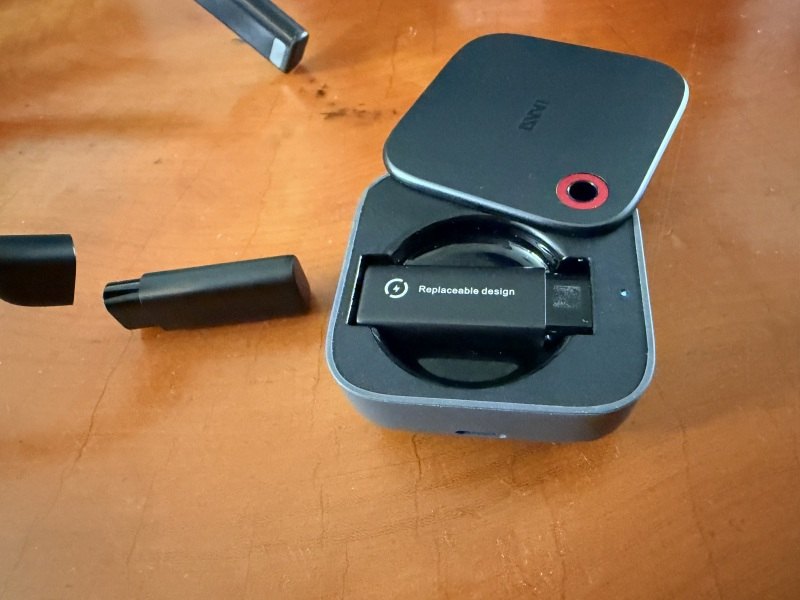
The GO3 is a 53-gram pair of glasses with a monochrome green waveguide display that projects a 30-degree virtual screen in front of your right eye, a Qualcomm Snapdragon chipset, 64GB of storage, an 8MP camera, dual directional speakers and a modular battery system. Two swappable 270mAh batteries feed into a charging case, yielding roughly eight hours of mixed use. The display is rated at 1,500 nits, with a 640×480 resolution that sounds modest until you realise it only has to render text.
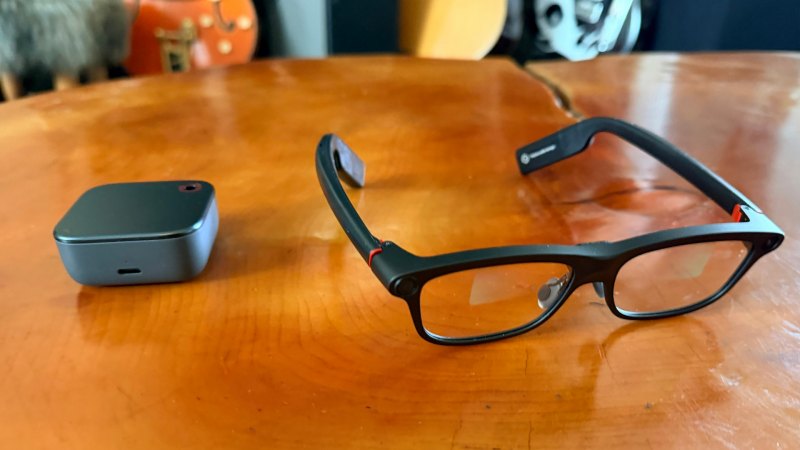
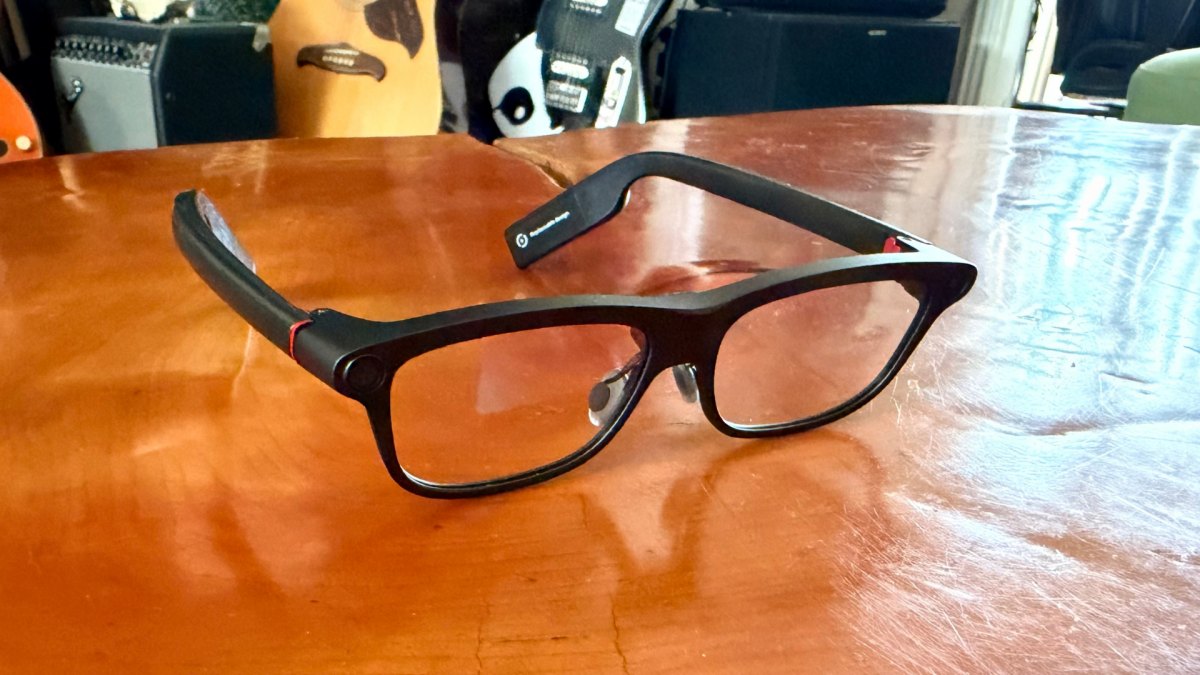
INMO’s design team invested heavily in making the glasses look ordinary. A 15-degree temple flare accommodates different head widths, cloud-foam nose pads distribute weight, and the proprietary IMAR optical engine is engineered to minimize forward light leakage — the green glow that betrays cheap waveguide glasses in dim rooms. In practice, the GO3 reads as slightly chunky eyeglasses rather than a gadget.
Translation Is the Killer App
The GO3’s core trick is real-time translation with subtitles in your vision: 261 languages online, 9 offline. Speech appears as text in the display while a synthetic voice reads it through the directional speakers. The company’s party trick is the INMO Speaker, a clip-on ring speaker that reproduces translations in a clone of your own voice. Demonstrated repeatedly at the fair, the effect is uncanny: you speak Chinese, and “you” reply in Spanish.
Voice cloning for translation sounds like a gimmick until you consider the social dynamics of negotiation. A translated sentence delivered in a neutral robotic voice makes the speaker sound like a device. The same sentence in the speaker’s own timbre preserves authority, humour and hesitation — the emotional information that determines how a counterpart responds. INMO claims sub-second response and near-zero perceived latency for the clone pipeline, and the demo holds up. For a salesperson negotiating across a table, this is not a novelty; it is the difference between a conversation and a transaction.
Teleprompter and Meeting Mode
Secondary features punch above their weight. The AI teleprompter scrolls at your speaking pace and tracks jumps, so presenters can glance without appearing to read. In a reading-room talk I watched at the fair, the speaker navigated a fifty-minute presentation with visible ease and no one in the audience noticed he was using a script. The system also offers AI meeting mode, transcribing and summarizing conversations, and AR recognition that pulls up names and details when it sees a saved contact — a small but genuinely useful social lubricant.
The display’s limits are the usual ones. At 1,500 nits it is legible indoors and in shade but washes out in direct sun, the persistent limitation of every waveguide on the market. The monochrome green rendering means no colour imagery, no video playback, no map graphics — this is a text display, and INMO is honest about it.
Hardware Reality Check
Camera quality is mediocre: 720p at 30fps with one-minute clip limits, adequate for reference captures and useless for content creation. Audio lacks noise cancellation for calls, which matters on a city street. The swappable battery system is clever in principle but means carrying spares or accepting a mid-day pause at the case. Storage is generous at 64GB, and the Snapdragon chipset keeps the interface responsive, but this is not a device for heavy multitasking.
Nor is it a general-purpose computer for your face. The app roster is small — translation, teleprompter, meeting notes, AR recognition, navigation prompts — and the system is closed to third-party installation. INMO has begun rolling out a developer platform, which is the right long-term move, but buyers in late 2026 are buying a focused tool rather than a platform.
Price and Value
List price is ¥3,299, but China’s national purchase subsidy — fifteen percent of the sale price, capped at ¥500 — plus promotion brings the street price to roughly ¥2,300, about $320. That is less than half of what screen-equipped Western rivals cost, and it explains much of the GO3’s sales momentum. For comparison, Xiaomi’s audio-only glasses sell around ¥1,999 and iFlytek’s translation glasses around ¥4,299, so the GO3 lands in the middle of the market with a display the cheaper option lacks.
The subsidy itself is worth noting as a policy signal. China has put smart glasses into a national trade-in programme, which effectively underwrites the category’s transition from early-adopter novelty to mainstream purchase. No Western market has an equivalent mechanism, and it shows in the pricing gap.
Provenance and Credibility
INMO has been shipping waveguide glasses since 2021 and claims an 80% share of the domestic translation-glasses segment. The GO3 picked up a CIIF award at the 26th China International Industry Fair this month and provided on-site interpretation support at APEC Digital Week events in July. This matters for buyers weighing risk: this is a company with a manufacturing track record and enterprise deployments, not a Kickstarter with a rendering.
Verdict
Rating: 4/5 — The INMO GO3 is the first AI glasses we’ve tested where the display earns its keep every single day rather than wowing for a weekend. Subsidized pricing makes it the most affordable screen-equipped option anywhere, and the voice-clone speaker feature is genuinely novel in a way that changes how cross-language conversations feel.
Battery swapping, camera quality and sunlight legibility keep it short of a universal recommendation. But for cross-border business users, interpreters, presenters and anyone who regularly speaks in a second language, it is the most complete package on the market — and at this price, the easiest to justify.
Day One With Subtitles in Your Vision
The first hour with a waveguide display is disorienting in a way no specification prepares you for. Text hovers slightly above your natural line of sight, and your eye keeps trying to focus on it as if it were a physical object a metre away, which produces a mild double-vision sensation until your visual system learns the trick. That adaptation period lasts somewhere between twenty minutes and a full day depending on the person, and it is worth mentioning because early buyers often assume something is wrong with the device.
Once adapted, the experience becomes genuinely additive. Reading a translation as text while hearing the original preserves both channels: you know what was said and what it meant, and you can cross-check one against the other. That dual channel is the feature that separates a display-equipped translator from an audio-only one, because audio translation forces you to trust the machine. Text lets you verify it — and for a business conversation, verification is the entire point.
The green monochrome rendering, often listed as a limitation, turns out to be the right call. Colour can’t be delivered at this brightness in a waveguide this thin, and trying would have meant a heavier, dimmer, more expensive product. Text is the payload, and monochrome green text at 1,500 nits is legible in most indoor conditions. The honest criticism is not colour but legibility in sunlight, where every waveguide on the market struggles equally.
Build Quality and the Eyewear Problem
Smart glasses live or die on whether people keep wearing them after the novelty fades, and that decision is made by the bridge of your nose. The GO3’s 53 grams is heavier than a normal pair of acetate frames and lighter than most headsets, which places it in the band where a well-fitted pair is comfortable for two or three hours and a badly fitted one becomes an irritant within thirty minutes. The 15-degree temple flare and cloud-foam nose pads help, but fitting still matters enormously — buyers should treat a physical fitting as a requirement, not a formality.
The design intent is clearly to look like ordinary eyewear, and it mostly succeeds. At conversational distance, the GO3 reads as slightly thick glasses rather than as a gadget, and the forward light leakage that betrays cheap waveguide products in dim rooms has been suppressed effectively. In a meeting room, nobody will ask what you are wearing. That is a higher compliment than it sounds, because the single biggest barrier to smart glasses adoption is the question “what are those?”
Durability is the unmeasured variable. Waveguide optics are delicate, hinges are the first point of failure on any folding device, and a 53-gram pair of glasses with electronics in the temples gets folded, pocketed and sat on. INMO has a warranty, but buyers should treat a protective case as mandatory rather than optional, and should assume a two-to-three-year service life rather than a decade.
The Economics of the Subsidy
China’s national purchase subsidy for smart glasses is the single most underreported fact about this product category. Fifteen percent off, capped at ¥500, is not a marketing discount — it is industrial policy, and its effect is to move a device from “interesting luxury” to “justifiable purchase” for a very large number of professionals. The GO3’s street price of roughly ¥2,300 against a list price of ¥3,299 is the direct result.
That policy has consequences beyond China. It means Chinese vendors can iterate on hardware with a volume base that Western competitors lack, and it means the price gap between a screen-equipped Chinese pair and a display-free Western pair is now small enough that the Western product’s simplicity argument gets harder to make. Buyers outside China should expect to pay closer to list, which changes the value calculation considerably — the GO3 is a strong product at ¥2,300 and a merely competitive one at ¥3,299.
Enterprise Use Cases Nobody Talks About
Consumer reviews focus on translation, but the deployments that will determine whether this category survives are industrial. Field engineers reading service manuals hands-free while working inside a machine. Warehouse staff receiving pick instructions without looking at a screen. Hotel and retail staff with instant translation for guests. Medical trainees observing procedures with reference material in view. Each of those use cases needs a display, not headphones, and each is underserved by phones because hands are occupied.
The GO3’s closed app roster limits this today, and the developer platform is the right long-term answer. Enterprises considering a pilot should ask three questions: whether the device can be centrally managed, whether data can be kept on-premises, and whether the app they need can be installed at all. Those are the questions that decide pilots, and they are rarely answered on a datasheet.
Honest Limits
The camera is the weakest component and should not be sold as a feature. 720p with a one-minute clip limit is adequate for capturing a business card or a whiteboard and inadequate for anything else. The absence of call noise cancellation means phone calls in a street are worse than on a normal headset. Battery swapping is a clever solution that requires carrying spares, and the case that charges them is another object in your bag.
None of these disqualify the product, because none of them are what it is for. The GO3 is a display for text you need to see while your hands and eyes are busy, plus translation good enough to change how a conversation feels. Judged as that, it is the best-value implementation on the market. Judged as a general-purpose computer for your face, it is not one, and buyers should not expect otherwise.
Three Conversations I Tried
A buying guide is more useful than a feature list, and three specific conversations illustrate what the GO3 does well and where it stops. The first was a supplier negotiation across a table with four people speaking quickly in Mandarin while I responded in English. The subtitle display let me follow the thread of the conversation rather than waiting for the interpreter’s summary, and the directional speaker carried my replies at a volume the table could hear without shouting. It worked, and it worked in a way that an audio-only device would not: I could see the original wording when a translation sounded odd, which is the difference between trusting a machine and checking it.
The second was a technical discussion involving part numbers and tolerances. Numbers, units and model codes are where machine translation is at its most reliable, and the GO3 handled them cleanly while the conversation stayed concrete. The failure came at the end, when a joke defused the tension and the translation flattened it into a statement. Everyone laughed anyway, out of politeness, which is precisely the sort of moment a device cannot manage.
The third was a walk through a factory floor with machinery noise. The directional speakers were not loud enough and the microphones struggled, and the conversation moved to a quieter room. That is not a flaw unique to INMO, but it is worth knowing that noisy industrial spaces are the difficult case, and that the device is at its best around a table.
The Software Detail That Matters Most
Latency, not accuracy, is what makes or breaks a translated conversation. A delay of two seconds turns a discussion into a series of statements; a delay under one second preserves the rhythm of interruption, agreement and follow-up that makes people feel understood. INMO claims sub-second response on the translation pipeline, and in the room it felt close to that for common pairs, with a longer pause on rarer ones.
The second detail is the transcript. Every session is logged, and the log can be exported. For anyone who has finished a meeting unsure whether a figure was agreed, having the bilingual record is worth more than the real-time display. Neither feature is glamorous, and together they are the reason the product is a tool rather than a demo.