
It is just past seven in the morning in a fourth-floor walk-up in the Chaoyang district of Beijing, and Lin Miao is already at her kitchen table. A freelance colorist and motion-graphics designer whose clients run from a Shanghai streaming platform to a handful of outdoor-equipment brands, she has two deadlines inside twelve hours: a forty-minute documentary cut that needs its final light grade before noon, and a thirty-second product film she storyboarded last night on the subway. On an ordinary morning she would have pushed the laptop aside, driven to the office she rents by the hour, and queued the render on the dusty six-core tower she keeps under a desk there. This morning she does not. She opens the black slab on her table, taps the glowing Copilot key, and asks the machine to transcribe six hours of on-set audio, rough-cut a selects sequence from forty minutes of interview footage, and batch-rename 300 RAW stills from a GoPro shoot she finished at midnight.
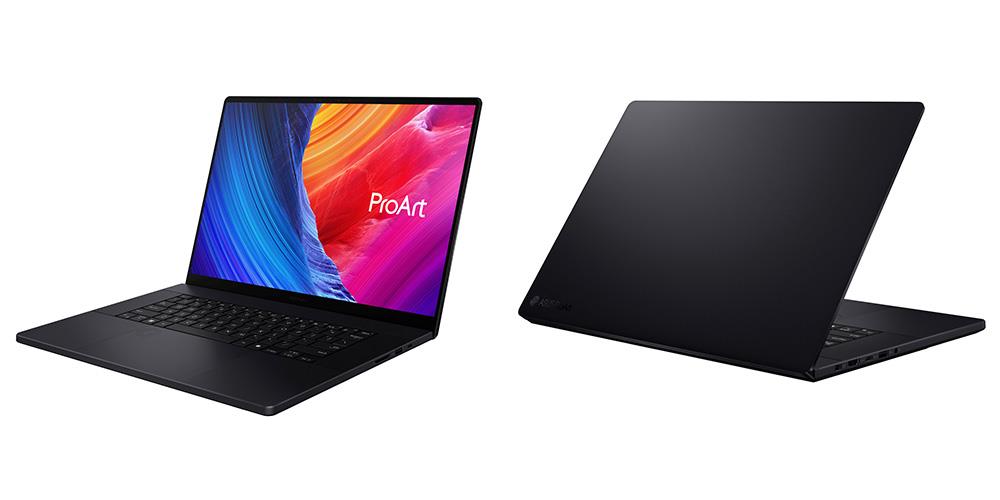
That is the pitch, anyway. The machine doing the work is the ASUS ProArt 创16 — known outside China as the ProArt P16, model H7606 — the flagship of Asus’s decade-old ProArt line, the notebook division’s answer to the question that has hung over the PC industry since 2024: what does a laptop look like when the person buying it is no longer paying primarily for raw speed, but for a computer that can do thinking on its own? The 2025/2026 version of the创16 pairs AMD’s Ryzen AI 9 HX 370 processor, a 50-TOPS neural processing unit, and an optional NVIDIA GeForce RTX 5090 laptop GPU with 24 gigabytes of GDDR7 memory, a 16-inch 4K OLED touch panel calibrated to Delta E below one, and a 90-watt-hour battery, all inside a chassis that weighs as little as 1.85 kilograms and measures 14.9 millimeters at its thinnest edge. In China, where the RTX 5080 and RTX 5090 configurations went on sale on October 1, 2025, Asus priced the flagship at 29,999 renminbi, or about $4,200. In the United States the machine starts at roughly $3,999.99; in Europe from about €3,199; in Australia a loaded 64-gigabyte, RTX 5080 configuration was recently advertised at A$7,699, discounted from A$9,199.
The创16 is, in other words, not a machine for everyone. It is a machine for the people Asus believes will decide whether the so-called AI PC transition actually happens: professional creators.
Product Market Analysis: Why the Creator Laptop Is the New Flagship
The PC industry spent the better part of two decades chasing the consumer thin-and-light. Then, around 2023, the math reversed. Unit volumes in mature laptop markets had flattened, the work-from-home boom had exhausted itself, and every manufacturer on the Taipei Neck — Asus, Acer, MSI, Lenovo’s and HP’s Taiwanese supply chains — found itself competing on a shrinking pool of replacement buyers. The growth, such as it was, sat at two extremes: the cheap Windows box for the education and emerging-market floor, and the expensive machine for the professional. The expensive machine is where the gross margins live, and the expensive machine for the last three years has been defined less by the word “gaming” and more by the word “creator.”
It is easy to underestimate how large this group has become. Freelance video editing, podcast production, influencer short-form video, indie game development, architectural visualization, 3D printing workflow, social-media content operations at small and mid-sized brands — all of these are jobs that barely existed as full-time occupations fifteen years ago and now employ millions of people between the United States, Western Europe, East Asia, and the swelling creator economies of Southeast Asia and India. Cisco, ARM, and a long list of analyst outfits have for years projected that content-creation workloads will grow faster than office productivity through the end of the decade. The machines that serve those workers were, until recently, awkward compromises: gaming laptops with garish RGB lighting and four-kilogram weights, or ultra-thin business laptops that choked the moment a 4K timeline appeared.
The AI layer changes the economics of this market in a way the marketing has so far struggled to describe. Microsoft’s Copilot+ PC branding, which the创16 carries on its lid in the form of a dedicated Copilot key, requires a neural processing unit of at least 40 TOPS. That number is not arbitrary: it is the threshold at which a modern laptop can run large language models locally, transcribe and summarize meetings in real time, and power the Windows studio features — live captions, background effects, recall-style search over your own files, Cocreator in Paint and Photos — that Microsoft is betting will make Windows feel indispensable again. The创16’s AMD XDNA2 NPU delivers up to 50 TOPS on its own; combined with the GPU’s tensor cores, Asus advertises a platform figure north of 80 TOPS.
What that means in practice is a quiet reshaping of the creative workflow. For a colorist like Lin Miao, speech-to-text transcription in Adobe Premiere Pro, automatic sequence framing, and scene-edit detection used to be tasks she would outsource to a junior editor or run overnight on a tower. On the创16 those tasks are offloaded to the NPU, which draws a fraction of the power a CPU or GPU would use and which can work while the machine is unplugged. For a 3D artist, the same tensor hardware that accelerates Blender viewport denoising and Stable Diffusion image generation also accelerates the AI denoise and frame-generation features inside DaVinci Resolve. The NPU, in other words, is not a second processor looking for work; it is the engine of a new division of labor inside the laptop, where the CPU handles threading and export, the GPU handles rendering and playback, and the NPU handles everything that smells like intelligence.
This is why Asus is so aggressively positioning ProArt. The line, launched in 2013 alongside the first Zenbooks and originally built around desktops and monitors, is the company’s most credible answer to Apple’s creative franchise. Apple, after all, spent fifteen years convincing a generation of photographers, filmmakers, and musicians that the Mac was the only machine that mattered. The M-series silicon made that argument dramatically stronger: a MacBook Pro 16 will still, today, deliver class-leading battery life and a screen that, for pure photo work, is hard to beat. But the Mac has structural weaknesses for a large slice of the creative economy. It does not run NVIDIA’s CUDA ecosystem, which is still the backbone of AI tooling, Premiere Pro hardware encoding for certain workflows, and the real-time rendering engines — Unity, Unreal, Octane, V-Ray — that game designers and product visualization studios depend on. It does not run Windows-only creative software, from certain industrial CAD packages to the Chinese-market editing platforms that a huge share of Asia’s creator economy uses. And Apple’s local AI story, built around Apple Intelligence, has moved more slowly than the Windows-Copilot+ roadmap.
Into that gap has poured a flood of Windows creator machines. The ProArt创16 is Asus’s flagship statement that a Windows laptop can match the MacBook’s build quality, beat it on GPU choice, and own the AI moment. It is not the only machine in the aisle — Lenovo’s ThinkPad P and Yoga Creator lines, Dell’s XPS and Precision families, MSI’s Creator Z series, Gigabyte’s AERO, and Razer’s Blade all compete for the same buyer — but the创16 is, on paper, among the most aggressively specified. A 4K OLED touch panel from a company that has spent the last decade as one of the world’s largest OLED panel buyers, a top-bin AMD HX processor, the first RTX 5090 laptop implementation in a sub-two-kilogram chassis, and a port stack that includes an SD Express 7.0 reader — the fastest card slot on any consumer laptop — because Asus watched photographers complain about slow card readers for ten years.
The business logic is visible in the product’s packaging decisions. Asus bundles the创16 with a three-month Adobe Creative Cloud subscription, a six-month Dropbox 500-gigabyte subscription, a year of its own ASUS Secure Auto-Backup, six months of GoPro Premium+, and a three-month Goodnotes subscription. It ships with a local application stack of its own making: StoryCube, a media-management and AI-assisted file organizer; MuseTree, which turns rough sketches into finished imagery; MuseCenter, the AI creative app Asus launched alongside the 2025创16 refresh; ProArt Creator Hub for color calibration and fan profiles; ScreenXpert for using a second mobile device as a second screen; and GlideX for seamless cross-device clipboard and file transfer. This is not charity. It is an attempt to make the创16 feel like a platform rather than a box, to hook the user into Asus’s software ecosystem the way Apple hooks users into iCloud and Continuity, and to give the machine differentiated reasons to exist beyond the underlying AMD and NVIDIA silicon it shares with a dozen competitors.
It is also a bet on a geography. The创16 is engineered, from its 2025 launch cadence, to China’s JD.com sales page, to the inclusion of CapCut — ByteDance’s editor, dominant in the Chinese and Southeast Asian creator markets — in its bundled app list, for the Asian creator. The RTX 5080 and 5090 configurations went on sale in Beijing and Shanghai on October 1, 2025, the start of the country’s Golden Week holiday shopping window. Asus is not pretending the创16 is primarily an American or European machine. It is a machine for the millions of creators in Shanghai, Shenzhen, Tokyo, Seoul, Singapore, and Mumbai who need CUDA, Windows, a calibrated screen, and a battery that survives a day of shooting on location.
Competitor Product Analysis: Who Else Is in the Room
If the创16 is Asus’s answer, it is worth spending a moment on the questions the answer is competing against. The field is not crowded in the sense of a dozen identical machines; it is crowded in the sense of four or five very different philosophies, each with a loyal following.
The elephant, obviously, is Apple. The 16-inch MacBook Pro, as of the autumn of 2026, ships with Apple’s M5 Pro and M5 Max chips and starts in China at 24,999 renminbi; a well-equipped M4 Max configuration with 48 gigabytes of unified memory and a terabyte of storage was selling in the United States for $3,899 to $3,999. The MacBook Pro 16 remains the benchmark for what a professional laptop can be: sixteen to twenty hours of battery life in light workloads, a Liquid Retina XDR mini-LED display that matches the创16’s color accuracy and beats it on sustained full-screen brightness, a chassis machined from a single block of aluminum that has aged into an icon, and a macOS software ecosystem — Final Cut Pro, Logic, DaVinci Resolve native builds, the whole Adobe suite — that has no peer. Where the MacBook Pro 16 loses, it loses on the axes the创16 was built to exploit. It has no CUDA GPU, so AI image generation, certain Premiere Pro accelerations, and real-time GPU rendering in Octane and V-Ray run on slower CPU paths or Apple’s own Metal alternatives, which are improving but still not equivalent. It has no 50-TOPS-class NPU in the Windows sense, so the Copilot+ features do not exist on the Mac; Apple Intelligence remains a separate, slower, and in some regions still incomplete rollout. And its port stack, while improved with Thunderbolt 5, remains a study in minimalism — three USB-C ports, HDMI, an SDXC slot, and a headphone jack, with no USB-A, no SD Express, and no barrel charger fallback. For a creator whose world is Windows software, NVIDIA acceleration, and local AI, the MacBook Pro 16 is less a competitor than a religion the user has already decided not to join.
The second philosophy is the business workstation, and its standard-bearer is Lenovo’s ThinkPad P1, now in its seventh generation. The P1 is a 16-inch Intel mobile workstation built around Core Ultra processors, optional NVIDIA RTX Ada or Blackwell workstation GPUs, and — critically for the corporate buyer — LPCAMM2 memory that the user can actually upgrade, ISV certification for AutoCAD, SolidWorks, and the other engineering packages, and a keyboard that ThinkPad loyalists will argue is still the best in the business. As of early 2026, clearance configurations of the P1 Gen 7 were listed on Lenovo’s US site for $2,249. The P1 is not a pretty machine; it is a dark gray slab with a pointing stick, and its screen, while excellent, is not an OLED. It competes with the创16 for a narrower buyer: the mechanical engineer, the architectural visualization artist, the VFX generalist who needs certified driver support and a machine that will survive a five-year corporate refresh cycle. Where the创16 wins on display, GPU ceiling, AI features, and pure creative software support, the P1 wins on repairability, keyboard, and institutional trust. It is the machine a company buys for its staff; the创16 is the machine a creative buys for herself.
Dell occupies the third philosophy, and its answer exists in two forms. The consumer-creator form is the XPS 16, a thin aluminum unibody with an OLED touch display, high-end H-series Intel silicon, and a price tag that, configured to match the创16, lands in the same stratosphere. The workstation form is the Precision line — the 5000-series and 7000-series mobile workstations, which Dell describes as among the best-selling mobile workstations in the world and which, in the Chinese market in 2026, started at roughly 12,560 renminbi for base configurations and climbed past 17,688 renminbi for the Dell Pro Max 16 Plus. Dell’s advantage is distribution: in the American enterprise market, Dell sells more mobile workstations than any competitor, and its Precision line carries the same ISV certifications, warranty programs, and on-site service that corporations demand. Dell’s disadvantage, as compared with Asus, is that the XPS line has historically been a product with a nervous relationship with its own thermals, and the Precision line is heavier and less pretty than a machine marketed to Instagram-native creators. Dell makes the safe choice. Asus is betting the creative market has outgrown safe.
The fourth philosophy is the gaming-laptop-as-creator-machine, and its most polished exponent is MSI. The company’s Creator Z series — descendants of the Z16 and Z17 HX Studio machines — pairs large-bore Intel Core Ultra HX processors with up to RTX 5090 laptop GPUs, 18-inch 4K mini-LED panels at 240 hertz, 64 or even 128 gigabytes of DDR5 memory, and a design language that strips out the RGB lighting in favor of a sober gray fabric finish. As of the autumn of 2026, a high-end MSI creator configuration with a 5090 and a 4K mini-LED panel was listed on the company’s US store for around $6,799.99 — comfortably above the创16’s street price for an equivalent GPU tier. MSI’s pitch is raw performance: larger chassis, larger vapor chambers, higher sustained power limits, and a screen that is brighter and faster than the创16’s OLED. Its weaknesses are weight, battery life, and a software bundle that, until recently, felt like an afterthought. Where the创16 is a 1.95-kilogram OLED machine with an NPU and a curated creative software stack, the MSI Creator is a 2.5-kilogram mini-LED machine that treats AI as a checkmark. For the creator who lives on a desk and never travels, MSI has an argument. For the creator who works on location, in co-working spaces, and on client sites, the创16’s 1.85-kilogram starting weight and OLED panel are a more persuasive package.
The picture that emerges is not that the创16 is the best machine in every category. It is that the创16 is the machine that best matches the current center of gravity of the professional creator market: a buyer who needs NVIDIA GPU horsepower, a great screen, local AI acceleration, and a chassis light enough to carry, and who is willing to pay a premium for the integration.
The Machine Itself: Build, Display, Performance, and Battery
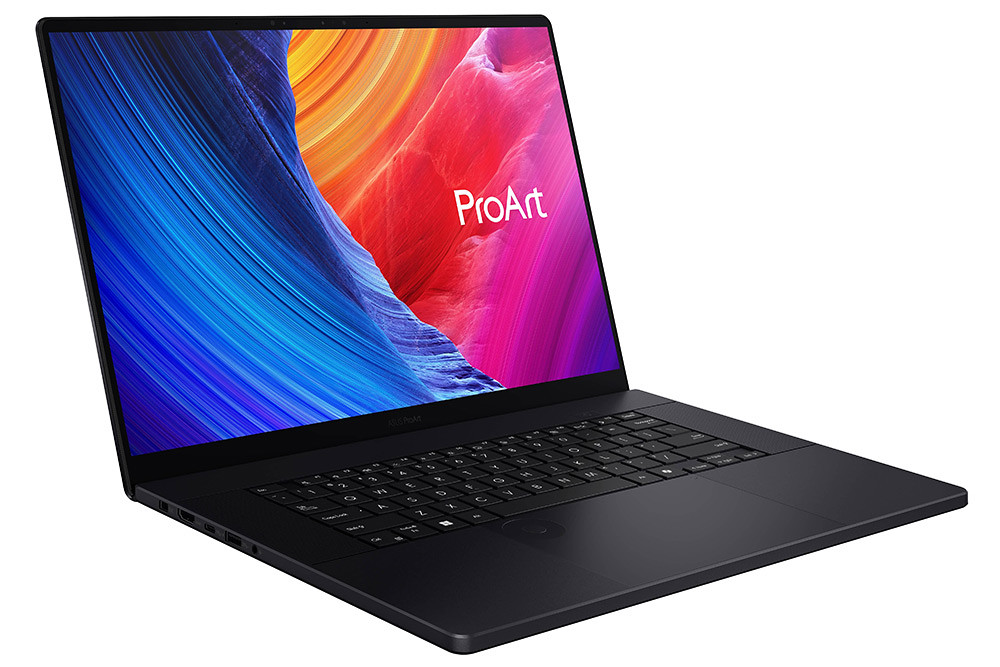
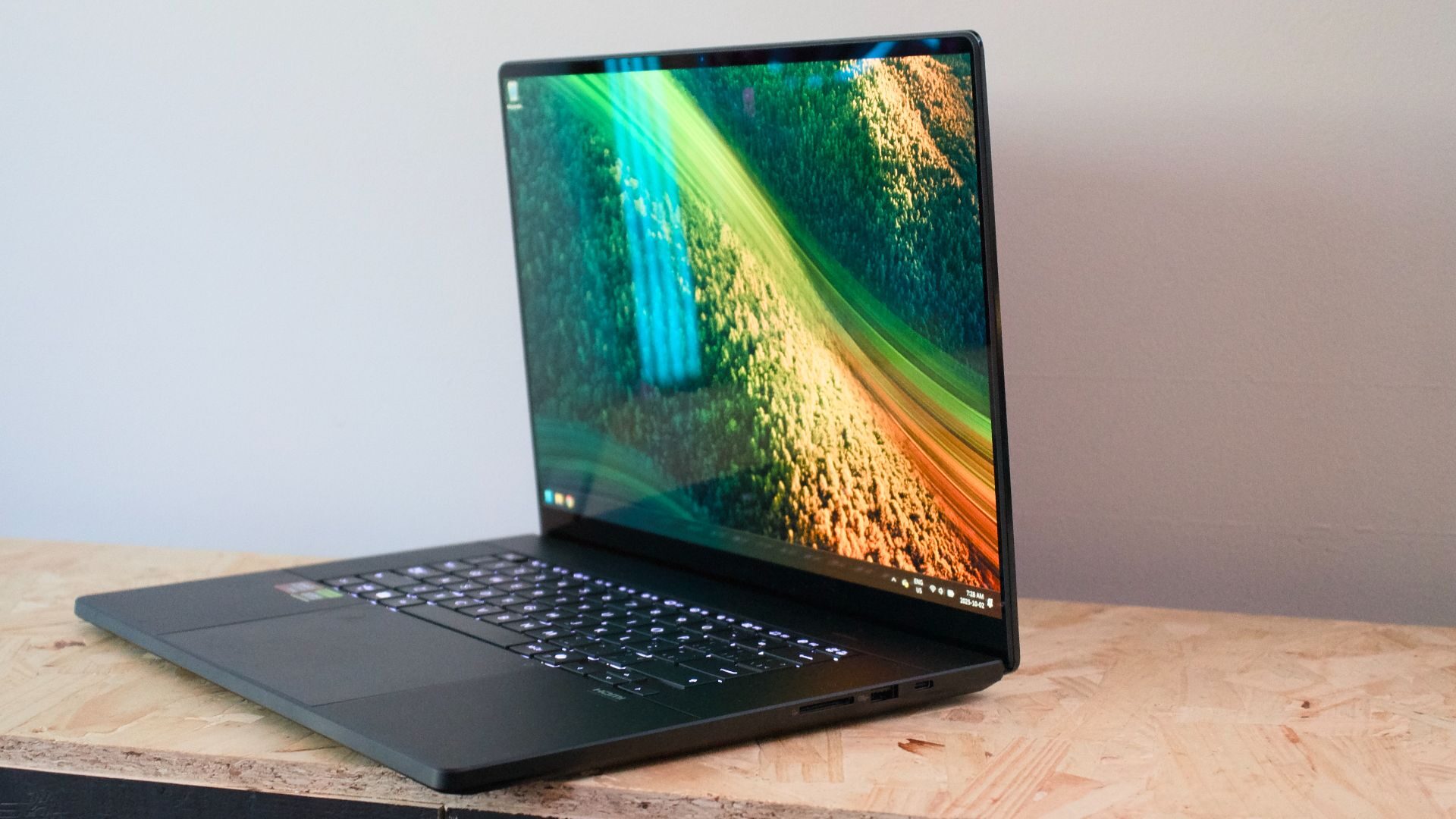
Open the box, and the first thing you notice is the absence of color. The创16 comes in what Asus calls Nano Black: a deep, matte, graphite-black anodized aluminum that has none of the blue-purple iridescence of recent ROG gaming laptops and none of the silver of a ThinkPad. The lid is a single slab of CNC-milled aluminum, with a small ProArt wordmark low on the right edge and a vertical micro-groove texture along the hinge line that Asus has used on recent ProArt and Zenbook products as a subtle brand signature. The chassis measures 354.9 by 246.9 millimeters, tapering from 14.9 millimeters at the front to 18.3 millimeters at the rear hinge. With the RTX 5080 or 5090 configuration on board it weighs 1.95 kilograms; the lower-RTX configurations, which use a slightly thinner rear section, come in at 1.85 kilograms. That is lighter than a 16-inch MacBook Pro — which weighs roughly 2.14 kilograms — and dramatically lighter than the MSI Creator Z16 or the Dell Precision 5000 series. It is, by the standards of machines shipping a 5090-class GPU, almost svelte.
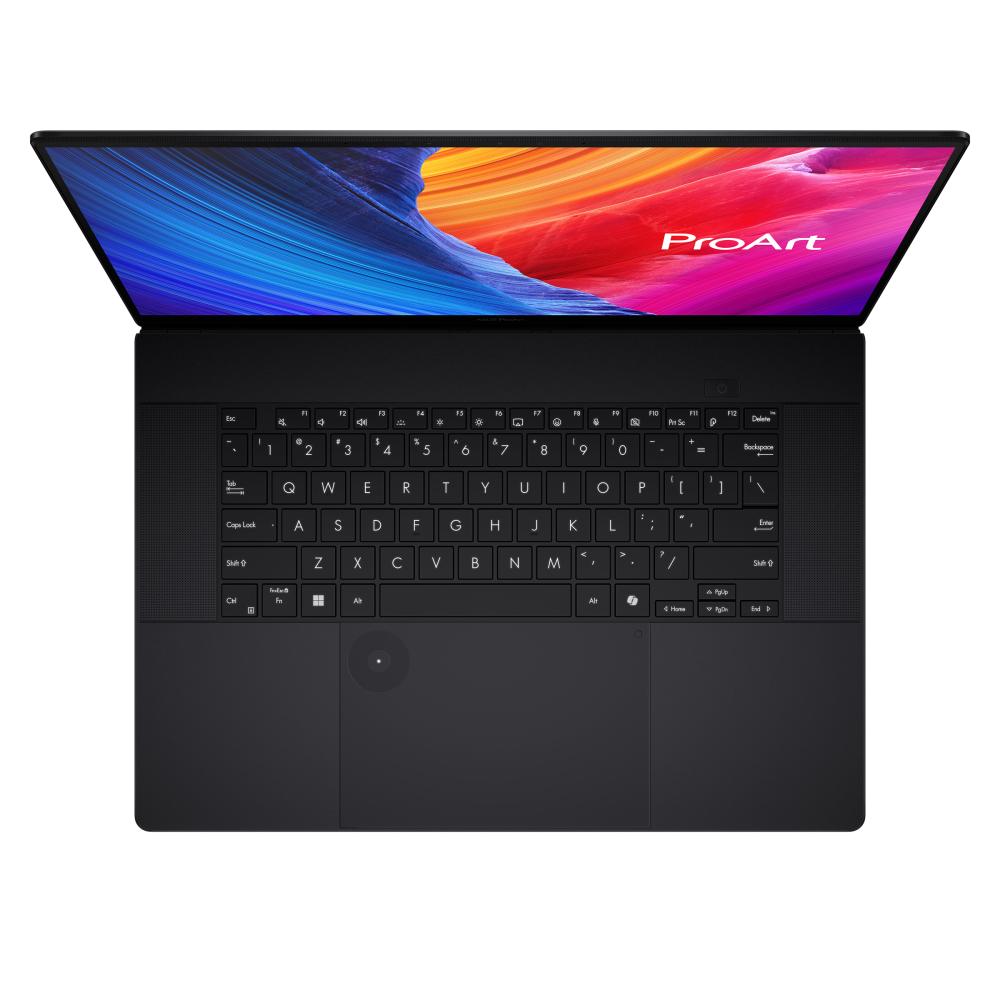
The keyboard is a tenkeyless layout, which is an unusual choice on a 16-inch chassis and one that Asus made deliberately. By dropping the numeric keypad, Asus freed the wrist-rest area for a larger audio system — six speakers, with a smart amplifier — and for a 7.1-inch precision touchpad that is one of the largest on any current laptop. The keys have 1.7 millimeters of travel, per Asus’s specification, with a backlit chiclet layout and a dedicated Copilot key in the lower-right area where a Menu key used to live. The machine supports Asus’s DialPad, a virtual on-screen dial for scrubbing timelines and adjusting brush size in supported software, and the touchpad itself is large enough to be genuinely useful for colorists who like to scrub timelines with a thumb. The webcam at the top of the screen bezel is a 1080p IR unit that supports Windows Hello facial login, and the microphone array is a three-mic setup with AI noise cancellation, which matters for the vlogger and podcast-recording segment Asus is courting.
The display is the reason this machine exists. It is a 16-inch ASUS Lumina Pro OLED panel, 16:10 aspect ratio, native resolution 3840 by 2400 pixels — that is, a 4K-class vertical-tall format that gives a video editor roughly an extra twenty lines of timeline above and below the picture as compared with a 16:9 4K panel. It is touch-capable, supports stylus input, has a 120-hertz refresh rate with variable refresh rate, a 0.2-millisecond response time, a peak HDR brightness of 1,600 nits, a measured contrast ratio of 1,000,000:1, 100 percent coverage of the DCI-P3 color gamut, factory calibration to Delta E below one, and VESA DisplayHDR True Black 1000 certification. Asus applies an anti-reflection coating to the glass and claims 70 percent less harmful blue light. The screen-to-body ratio is 88 percent, which is excellent for a 16-inch laptop with a webcam.
In real use, this panel is the sort of screen that makes you reassess what you were looking at before. OLED’s per-pixel emissive structure means true black, infinite-looking contrast, and HDR highlights that pop the way a consumer IPS panel simply cannot reproduce — the VESA True Black 1000 certification is specifically the OLED HDR tier, and it shows. A documentary grade on the创16 will look like a documentary grade should look: deep shadows with visible detail, skies that bloom without clipping, skin tones that hold up when you push them. The 120-hertz refresh rate and VRR make timeline playback smooth and scrolling in large Photoshop files feel fluid, and the 0.2-millisecond response time means motion graphics preview without the ghosting that OLED panels of three or four generations ago were known for. The trade-off, and it is a real one, is that OLED is dimmer than the best mini-LED panels in sustained full-screen use — 1,600 nits is a peak number for small HDR highlights, and a bright white document in a sunlit room will look less bright than it would on an XDR MacBook or a mini-LED MSI. Asus’s anti-reflection coating helps enormously, but it does not eliminate the physics. For indoor studio work, which is where this machine will spend 90 percent of its life, the panel is best in class. For outdoor work in direct sunlight, it is merely very good.
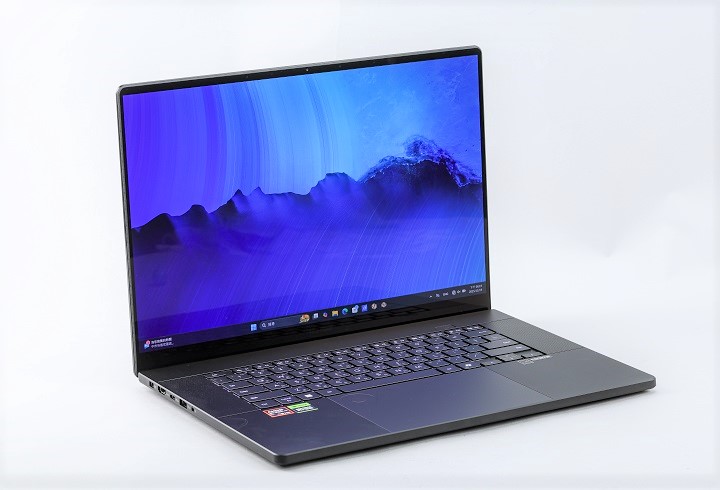
Under the hood, the top configurations pair the Ryzen AI 9 HX 370 — a 12-core, 24-thread Zen 5 part with a base clock of 2.0 gigahertz and a boost of 5.1, with 36 megabytes of cache — with up to an RTX 5090 laptop GPU carrying 24 gigabytes of GDDR7 video memory. The RTX 5080 configuration has 16 gigabytes of GDDR7; the RTX 5070 and 5070 Ti configurations sit below it. Memory is 32 or 64 gigabytes of LPDDR5X-7500 soldered to the board; storage is a 1, 2, or 4 terabyte PCIe 4.0 NVMe SSD, with two M.2 2280 slots on board — one running at full PCIe 4.0 x4 speed, one at x2 — which means the user can add a second drive after purchase. The NPU, the AMD XDNA2 block inside the HX 370, delivers up to 50 TOPS of neural compute on its own. NVIDIA’s Blackwell GPU adds its own tensor-core AI horsepower, and Asus cites a combined platform figure of roughly 80 TOPS.
The thermal design is the mechanical achievement that makes the rest possible. Cooling a 5090-class GPU and a 5.1-gigahertz HX processor in a 1.95-kilogram chassis is not a trivial problem, and Asus’s solution is a three-fan, five-heatpipe layout with liquid metal thermal compound on the CPU and GPU dies and what it calls a stealth air-outlet design that vents through the hinge area rather than through the bottom panel. The system is rated for a 240-watt AC adapter on the 5080 and 5090 configurations; the lower configurations use a 200-watt brick. Reviewers have noted that the system performs as advertised in sustained workloads — 4K Premiere Pro exports, Blender renders, and DaVinci Resolve grading sessions run at near-peak power without obvious throttling — but at the cost of heat on the chassis underside and fan noise under full load. This is the classic trade-off of a thin creator laptop, and the创16 is no exception. On a desk, with the fan profile set to Performance, the machine is audible; on a lap, it is warm. Asus’s Ambient Cooling mode quiets the fans for lighter workloads, and the reviewers who have tested the machine in productivity mode report it remains unobtrusive for web browsing, document editing, and even light photo work.
The battery is the weakest part of the specification sheet, and it is worth being honest about it. The创16 carries a 90-watt-hour four-cell battery, which is close to the maximum the Federal Aviation Administration allows in a laptop. Despite that, independent reviewers have reported roughly 6.5 hours of mixed productivity use on a charge, and materially less under video-editing or GPU workloads. The 4K OLED panel and the discrete RTX GPU are the culprits: a 3840-by-2400 OLED at 120 hertz is a power-hungry display, and even with AMD’s hybrid-graphics technology routing light tasks to the integrated Radeon GPU, the machine is not going to match a MacBook Pro 16’s fifteen-hour workday. It will, however, comfortably outlast most Windows competitors in its class, and it supports 100-watt USB-PD charging over either USB-C port, which means a creator traveling light can carry a single GaN charger that also phones and tablets use. The 240-watt barrel brick is, by modern standards, a brick.
The port stack is, for a creator laptop, exemplary. On the right side, Asus puts a USB 4 Type-C port running at 40 gigabits per second with display output and power delivery, a USB 3.2 Gen 2 Type-A port at 10 gigabits per second, the 3.5-millimeter combo audio jack, and the DC-in barrel. On the left side, there is a second USB 3.2 Gen 2 Type-C port at 10 gigabits per second with display and power delivery, a second USB-A 10-gigabit port, an HDMI 2.1 FRL output that can drive an external 4K 120-hertz monitor, and an SD Express 7.0 card reader — the fastest SD slot currently available on a consumer laptop, which reads a UHS-II camera card at roughly double the speed of a standard UHS-II slot and, in real world terms, imports a 128-gigabyte memory card in under two minutes. Wi-Fi 7 and Bluetooth 5.4 complete the wireless picture. There is no built-in Ethernet, but Asus includes a USB-A-to-gigabit-Ethernet adapter in the box in most markets, and Wi-Fi 7 is fast enough that the omission is minor.
Pros and Cons: A Balanced Reading
The case for the创16, stated plainly, is that it is the most complete expression of the Windows creator-laptop thesis currently on sale. No competitor in its weight class ships a 4K OLED touch panel as good as the Lumina Pro, with the factory color calibration and PANTONE validation this one carries. No competitor at this price ships an SD Express 7.0 reader. Few competitors ship the RTX 5090 laptop GPU in a chassis this light. The Ryzen AI 9 HX 370 platform delivers the 50-TOPS NPU that unlocks Microsoft’s Copilot+ features, and the bundled creative software — StoryCube, MuseTree, MuseCenter, ProArt Creator Hub — is, for all the bundling’s commercial motives, genuinely useful for the workflows it targets. The machine passes MIL-STD 810H durability testing, which matters for a creator who travels. The dual M.2 slots mean storage can grow. The audio system is, for a laptop, remarkably good, and the TKL keyboard and oversized touchpad are ergonomic choices that a working colorist will appreciate. And the price, while not cheap, is competitive: the RTX 5080 configuration at 25,999 renminbi in China, or roughly $3,600 to $3,800 equivalent in the West, is meaningfully less than a similarly configured MacBook Pro 16 or an MSI Creator Z with the same GPU tier.
The case against the创16 is equally plain, and it would be a disservice to a working professional to paper over it. The battery life is good by Windows creator-laptop standards and disappointing by MacBook standards; plan on carrying the charger. The chassis gets warm and the fans get loud under sustained GPU load, which is expected at this performance-per-kilogram ratio but which is noticeable in quiet rooms. The memory is soldered — 32 or 64 gigabytes at purchase, no upgrade later — which matters for the 3D artist who may want 96 or 128 gigabytes in three years. The OLED panel, for all its virtues, is not as bright as the best mini-LED panels in sustained outdoor use, and OLEDs carry the eternal risk of burn-in from static UI elements, which is why Asus ships the machine with an OLED Care screensaver and pixel-shifting software. The bundled software, however useful, is also the kind of thing a serious professional will partly uninstall: CapCut is a consumer editor, the Adobe subscription is a three-month trial, and the Dropbox and GoPro subscriptions are marketing expenses as much as tools. And the 4K OLED at native resolution is, for some Windows applications, a scaling headache — Asus has improved its Windows scaling handling enormously over the last five years, but a handful of older creative plugins and game editors still render at fuzzy fractional scaling.
None of these are disqualifying. They are the normal compromises of a 1.95-kilogram laptop with a 5090-class GPU, and a knowledgeable buyer will weigh them against the alternatives. The创16 is, at its best, a machine that asks you to accept modest battery life and warm chassis in exchange for the best screen in its class, the most complete port stack, and a genuinely useful local AI compute tier.
Consumer Buying Considerations: What to Actually Decide
If you are a working creative staring at the创16’s product page, the configuration decision is the first and most consequential choice. The GPU tier is the single biggest variable in price, weight, and sustained performance, and it maps almost perfectly onto the kind of work you do. If your work is photography, graphic design, short-form video editing in CapCut or Premiere at 1080p or light 4K, social-media content, and podcasting, the RTX 5070 or even the lower configurations will be plenty, and you will save money, reduce heat, and gain the 1.85-kilogram chassis weight. If your work is regular 4K multi-camera editing in Premiere or DaVinci Resolve, motion graphics in After Effects, and light 3D work in Blender, the RTX 5080 with 16 gigabytes of GDDR7 is the sweet spot: 16 gigabytes of video memory is the threshold at which Resolve’s AI features, Blender’s viewport denoising, and Stable Diffusion’s larger image sizes start to feel comfortable, and the 5080 configuration at 25,999 renminbi is where the创16 arguably makes the most business sense. If your work is heavy 3D rendering, game development, VFX, or 8K video editing, the RTX 5090 with 24 gigabytes of GDDR7 is the configuration to buy — and the price premium, while steep, is less than the cost of a workstation tower plus a second laptop.
The RAM decision is less interesting because the memory is soldered. Buy the maximum you can afford, and buy it now: 64 gigabytes if you work with 4K footage, 3D scenes, or large Photoshop documents with many layers, 32 gigabytes if your work is lighter. The storage decision is easier because of the dual M.2 slots: buy the smallest SSD the configuration allows and add a second drive yourself later, unless you would rather not open the chassis. The 90-watt-hour battery is standard across configurations, and the display is the same 4K Lumina Pro OLED touch panel across the board. The only remaining variable is software: Asus bundles a three-month Adobe Creative Cloud subscription, which is a genuine value if you do not already have one, and a series of shorter subscriptions to Dropbox, GoPro, and Goodnotes, which are nice but not load-bearing.
The operating-system question is, for a large share of potential buyers, the real decision. Windows versus macOS is no longer a question of which machine is faster; it is a question of which software ecosystem you live in. If your work is photography in Lightroom, music production in Logic, film grading in Final Cut, or any workflow built around Apple’s professional apps, the MacBook Pro 16 will serve you better, and its battery life and build quality remain unmatched. If your work is anything built on NVIDIA’s CUDA platform — Premiere Pro GPU acceleration, DaVinci Resolve’s neural engine, Blender’s GPU rendering, Octane and V-Ray, Unreal Engine’s real-time ray tracing, the fast-growing ecosystem of local AI image and video tools — the创16 is the more sensible machine. If your work uses Windows-only software, whether industrial CAD, Chinese-market editors like CapCut at its full feature set, or a corporate IT stack, the decision makes itself. The创16 is a Windows machine, and that is a feature, not a bug, for the audience Asus is courting.
The cooling and noise question is worth planning around. The创16 performs best on a hard desk surface with the rear vents unobstructed; it will not sustain peak performance on a bed, a couch, or your lap for long stretches. If you work in quiet environments — a shared co-working space, a library, a client’s conference room — set the fan profile to Performance only when you need it, and use the Balanced or Quiet profiles for everything else. The 240-watt adapter is heavy; for day trips to a coffee shop, a 100-watt USB-PD charger will run the machine for light workloads, though it will not feed a GPU under full load. The OLED screen benefits from Asus’s OLED Care software, which shifts the taskbar and dims static elements to reduce burn-in risk; enable it. For professional color-critical work, the panel ships factory-calibrated to Delta E below one, but re-running the calibration with a hardware puck every six months is good practice, and ProArt Creator Hub makes this easy.
The warranty and after-sales picture matters at this price point. Asus ships the创16 with a two-year international warranty in most markets, with optional extended-service plans. For a freelance creative, that two-year window is the period during which the machine will earn back its cost; buying the accidental-damage upgrade is a reasonable expense, particularly if the machine travels. In China, where the创16 was first sold through JD.com and Asus’s own store, the launch promotions — a free ProArt backpack for RTX 5070-and-up configurations, bundled software subscriptions, and a 30-day return window — are worth paying attention to, because they materially improve the value proposition at purchase.
Market Summary and Product Summary
The market into which the ASUS ProArt 创16 arrived in the autumn of 2025 was a market in transition. The AI PC wave, which Microsoft and its silicon partners AMD, Intel, and Qualcomm had spent nearly two years evangelizing, was beginning to find its first real use cases: local transcription, AI-assisted media management, real-time background effects, and the first generation of on-device creative tools that genuinely save a working professional time. The creator-laptop segment, meanwhile, had matured from a gaming-laptop derivative into its own product category, with its own design language, its own display priorities, and its own buyer. Asus’s ProArt line, for a decade a boutique side project, had become strategically central: it was the company’s most credible vehicle for selling high-margin machines to professional buyers at a moment when the consumer PC market had stalled.
The创16 is, within that picture, a remarkably coherent product. It pairs the best display Asus has ever put in a 16-inch laptop — a 4K OLED touch panel with factory calibration and VESA True Black certification — with a top-tier AMD processor and NPU platform that satisfies the Copilot+ PC requirements, with a choice of NVIDIA Blackwell laptop GPUs up to the RTX 5090, with a port stack that includes the fastest SD reader on the market, and with a bundled software ecosystem that Asus is trying to turn into a real creative platform. It is lighter than its competitors, better cooled than its weight suggests, and priced at a level that, while not cheap, undercuts the equivalent configurations from Apple and MSI.
Its weaknesses are real and predictable: modest battery life by MacBook standards, warm chassis and audible fans under sustained GPU load, soldered memory, and the eternal trade-offs of an OLED panel. But these are the weaknesses of the category, not of the product, and a working creative who has priced out a tower plus a laptop, or who has compared the创16 against a MacBook Pro 16 and decided she needs CUDA, will find the trade-offs reasonable.
For Lin Miao, the colorist at her kitchen table, the创16 has already justified itself. The transcription finished while she drank her coffee. The rough-cut selects sequence was waiting when she opened Premiere. The batch-renamed RAW files imported without incident. By the time the documentary director called at nine o’clock, the timeline was assembled, the rough grade was underway, and the machine was sitting at 70 percent battery — not enough for a full day away from a charger, but enough for a morning’s work. That is the promise of the AI PC, made tangible: a laptop that does the thinking so the creative can do the making. The ASUS ProArt创16 is not perfect. It is, however, the most complete Windows answer to that promise currently on sale, and it is the machine Asus will be measured against — and measured by — for the next two years.